Fun Frontend & Mobile Games Collection
2024Three interactive apps: a dependency-free HTML5 Breakout clone, an AI-powered Angular Tic-Tac-Toe, and a low-latency Android Virtual Piano.
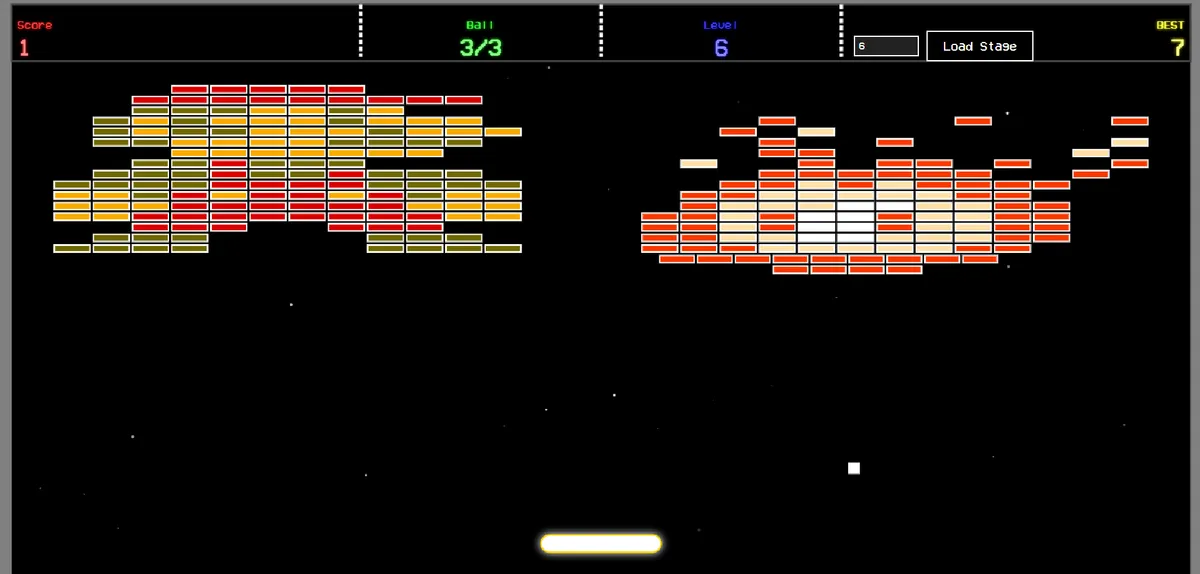
This collection highlights three distinct interactive projects built across different platforms and frameworks. Each project tackles unique challenges in game state management, collision physics, heuristic AI, and low-latency hardware interaction.
1. Retro Breakout Canvas Game
The Problem
Building a fluid, responsive browser game from scratch requires meticulous management of state, rendering, and physics. Relying on heavy game engines for simple 2D games can lead to bloated load times. The challenge was to build a complete arcade game strictly using Vanilla JavaScript, handling complex collision mathematics, responsive touch/keyboard controls, and a smooth 60 FPS rendering cycle without external libraries.
The Solution
I engineered a custom Breakout clone directly on the HTML5 Canvas API, utilizing requestAnimationFrame for an optimized game loop.
Here is a breakdown of the core technical implementation:
Physics & Collision Engine
- Developed a custom intersection algorithm to calculate ball-to-brick collisions accurately, adjusting the ball’s trajectory based on the exact contact point and paddle momentum (
BALL_SPINvariables). - Programmed boundary physics to ensure the paddle and ball interact seamlessly with the viewport edges across various device sizes.
Entity & State Management
- Dynamic Level Generation: Created a mapping system that translates multi-dimensional string arrays into fully rendered pixel-art stages (featuring themes like Mario, Arkanoid, and Retro).
- Power-up System: Implemented polymorphic power-ups (Paddle Extension, Sticky Paddle, Extra Life, Super Ball) that drop based on a probability matrix (
PUP_CHANCE) when specific bricks are destroyed.
Multimedia & Performance
- Integrated an asynchronous audio system to handle simultaneous sound effects (bounces, power-ups, brick destruction) and dynamic background music that switches based on the current level.
- Leveraged
localStorageto persist high scores locally across sessions.
The Results
The result is a highly polished, cross-platform browser game. By utilizing native Canvas drawing methods with pixelated image rendering, the game maintains a nostalgic aesthetic while delivering modern, lag-free performance on both desktop keyboards and mobile touchscreens.
2. Angular Tic-Tac-Toe with AI
The Problem
While Tic-Tac-Toe is a simple game, implementing it as a robust Single Page Application (SPA) presents excellent opportunities to practice modern component architecture and state management. The goal was to build a highly modular application that seamlessly tracks complex game states (turns, scores, win/draw detection) and includes an AI that can play intelligently against a human user.
The Solution
I developed a standalone Angular application, breaking the UI down into modular components (BoardComponent, SquareComponent, AiToggleComponent) to ensure clean data flow and reusability.
State-Driven Architecture
- Used Angular’s
@Input()and@Output()decorators to pass the board state from the parentBoardComponentdown to individualSquareComponentbuttons. - Implemented a reactive scoring system that instantly calculates horizontal, vertical, and diagonal win conditions or draw states after every single move.
Custom Heuristic AI
Instead of completely random moves, I engineered a rule-based AI opponent that evaluates the board array to determine its optimal next move:
- Offense: Checks if it can win on the current turn.
- Defense: Scans the board to block the human player from completing a winning line.
- Strategic Positioning: Prioritizes claiming the center square, followed by corners, and finally random empty edges.
Responsive & Thematic UI
- Styled the application with heavily customized SCSS, utilizing CSS Grid for the board layout.
- Implemented dynamic class bindings to color-code user moves (Green for ‘X’, Red for ‘O’) and applied custom animations (hover scaling, drop shadows) to create an engaging, tactile user experience.
The Results
The application serves as a perfect demonstration of component-based architecture in Angular. The resulting game is bug-free, fully responsive across mobile and desktop, and offers an engaging single-player experience thanks to the priority-based AI decision loop.
3. Virtual Piano Mobile App
The Problem
Developing mobile audio applications comes with a strict requirement: latency. When a user presses a piano key on a screen, the sound must trigger instantaneously. Standard media playback libraries often introduce micro-delays that ruin the musical experience. Furthermore, the UI must accurately represent a real piano keyboard and handle multiple simultaneous touch events (chords).
The Solution
I developed a native Android application tailored specifically for low-latency audio interaction and responsive touch events.
Watch the Application Demo:
Low-Latency Audio Architecture
To ensure the app felt like a real instrument, I bypassed standard high-overhead media players.
- Mapped individual
.wavor.mp3note files to a memory-efficient audio pool. - Allowed for polyphony, enabling the user to press multiple keys at once to play chords without cutting off the audio streams of previously pressed keys.
Multi-Touch Interface (XML & Java)
- Designed a custom XML layout overlapping white and black keys, ensuring accurate hitboxes for every note.
- Programmed touch listeners in Java to detect
ACTION_DOWNandACTION_UPevents, creating visual feedback (key depressions/color changes) exactly synced with the audio trigger.
The Results
The Virtual Piano app successfully transforms an Android device into a pocket-sized musical instrument. By prioritizing audio performance and accurate UI mapping, the application delivers a highly responsive, lag-free musical experience for end-users.